Adding APC to MediaTemple Grid Service

I have a client that wanted to start his own personal blog. He’s in the IT industry and wanted to use WordPress, he didn’t know what Shared Hosting Provider to go with. I suggested two, dreamhost.com and mediatemple.com

I don’t like shared hosting, why? It’s either slow at time for hours or always slow, so instead I just grab a VPS and pay the $30 or $50 month so my sites load fast. You could even ditch your Grid Service and go with a Dedicated Virtual, and achieve lighting fast page loads on your WordPress/PHP site.

Anyways, lets talk more about how to setup APC properly on the Grid Service. I mean lets really talk about it, because I always forget the steps.

You will need to first download the latest stable version of APC, I’ve had issues with the beta version and the stable version. But far less with the stable version. If you want to pick and choose which version to run visit the APC PECL Website directly at http://pecl.php.net/package/APC

I almost forgot, if you want to follow the instructions in this guide. You will need to have SSH access enabled on your Grid Service account. This guide will assist you.

http://kb.mediatemple.net/questions/16/Connecting+via+SSH+to+your+(gs)+Grid-Service

Once you have access and the URL to the latest stable release of APC (3.0.19 as of this writing). You will want to wget the file to the root of your account.

1
wget http://pecl.php.net/get/APC-3.0.19.tgz

Decompress and untar the archive, change directory to the extracted contents and phpize the module.

1
2
tar -zxvf APC-3.0.19.tgz
cd APC-3.0.19

Next you will want to run phpize. The phpize command prepares the PECL modules build environment.  Once you run phpize you will see something similar to the following:

1
2
3
4
5
server@n10:~/APC-3.0.19$ phpize
Configuring for:
PHP Api Version:         20020918
Zend Module Api No:      20020429
Zend Extension Api No:   20050606

Now we want to set the configuration options for the module. You will need to find out what version of PHP your Grid Service is running, you need to know the Major and Minor numbers. You can get this information from phpinfo, you will need to create a new file inside your sites html directory and enter the following:

1
 

Make sure the file has a .php extension and then open up a browser and view the file. You should be presented with something like the following.
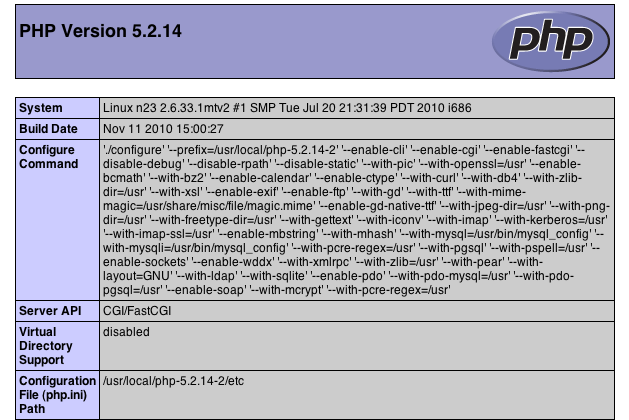
You can see that we’re running PHP 5.2.14-2, the “-2″ is more or less for MediaTemples reference.

Next you want to type out the following command and run it, pay special attention to the “-with-php-config” portion as this is important, make sure you find the right location of this file then run the command.

1
./configure -enable-apc -enable-apc-mmap -with-apxs2=/usr/sbin/apxs -with-php-config=/usr/local/php-5.2.14-2/bin/php-config

A bunch of text should scroll, hopefully no errors. Now we want to make the module so just type “make”.

1
2
3
4
5
6
7
8
9
10
11
12
13
14
15
16
17
18
19
20
21
22
23
24
25
26
xxxxxxx.com@n10:~/APC-3.0.19$ make
/bin/sh /home/xxxxx/users/.home/APC-3.0.19/libtool --mode=compile gcc -I. -I/home/xxxxx/users/.home/APC-3.0.19 -DPHP_ATOM_INC -I/home/xxxxxx/users/.home/APC-3.0.19/include -I/home/113041/users/.home/APC-3.0.19/main -I/home/xxxxxx/users/.home/APC-3.0.19 -I/usr/local/php-5.2.14-2/include/php -I/usr/local/php-5.2.14-2/include/php/main -I/usr/local/php-5.2.14-2/include/php/TSRM -I/usr/local/php-5.2.14-2/include/php/Zend -I/usr/local/php-5.2.14-2/include/php/ext -I/usr/local/php-5.2.14-2/include/php/ext/date/lib -DHAVE_CONFIG_H -g -O2 -c /home/xxxxxx/users/.home/APC-3.0.19/apc.c -o apc.lo

-------------CUT TO SAVE SPACE--------------

----------------------------------------------------------------------
Libraries have been installed in:
/home/xxxxx/users/.home/APC-3.0.19/modules

If you ever happen to want to link against installed libraries
in a given directory, LIBDIR, you must either use libtool, and
specify the full pathname of the library, or use the `-LLIBDIR'
flag during linking and do at least one of the following:
- add LIBDIR to the `LD_LIBRARY_PATH' environment variable
during execution
- add LIBDIR to the `LD_RUN_PATH' environment variable
during linking
- use the `-Wl,--rpath -Wl,LIBDIR' linker flag
- have your system administrator add LIBDIR to `/etc/ld.so.conf'

See any operating system documentation about shared libraries for
more information, such as the ld(1) and ld.so(8) manual pages.
----------------------------------------------------------------------

Build complete.
(It is safe to ignore warnings about tempnam and tmpnam).

Now we just need to make the appropriate directories for the module to reside. The directory you need to find is called “data”, if you follow these steps below you can navigate to the directory. Then make the proper directories, and then copy the module.

1
2
3
4
5
cd ~/
cd ../..
cd data
mkdir -p lib/php
cp ~/APC-3.0.19/modules/apc.so

The last step is to modify the php.ini and have PHP load the newly created apc.so module. (Note: in the second example, the ‘xxxx’ stands for your user number, you can find this by running “pwd”)

1
2
3
nano ~/../../etc/php.ini
or
nano /home/xxxx/etc/php.ini

Then just add the following lines:

1
2
extension_dir = /home/113041/data/lib/php
extension = apc.so

You should now have APC loaded into PHP, double check by going to the phpinfo page you made and search for APC. It should give you some information and configuration variables. Furthermore, if APC is not being loaded and shown on the phpinfo page, enable the error log (http://wiki.mediatemple.net/w/GS:Read_access_logs_and_error_logs) and see if any error messages are being generated.

Hope you enjoy!

Share it now!
Be a fan

18 thoughts on “Adding APC to MediaTemple Grid Service

  1. (mt) Matt

    Thanks for the mention and the how-to on APC setup. We always enjoy seeing reviews and articles that deal with troubleshooting issues. You are not only informing our customers, but you are also giving us insight on what we need to work on improving. Let us know if you have any further questions our comments regarding our services.

  2. Matthew

    Just tried this with a pretty fresh (gs) account and there wasn’t any php config in the /usr/local/php-5.2.14/ directory. However, /user/local/php5/bin/php-config worked, and I successfully enabled APC after using that config directory for ./configure.

  3. Jordan Post author

    Hey Mathew, sorry about the late response. I didn’t know your comments were queue’d for moderation.

    Yea, I noticed lots of articles related to find the config to vary. I notice at times there are different configs on the server, and people will need to manually need to find the config at times.

  4. Pingback: Adding APC to MediaTemple Grid Service - Monday By Noon

  5. Michael

    Mike, I had the same problem. I created a symbolic link (shortcut):

    1
    ln -s /usr/local/php-5.2.14/bin/phpize phpize

    then you can run

    1
    phpize

    Jordan, thanks again for posting this tutorial.

  6. Ed

    I just stumbled upon this article when i am researching if Grid Support APC. I also read a site with comment at the bottom
    http://www.designguru.org/blog/120810/how-install-apc-media-temples-gridserver-accounts

    Due to the design of the (gs) Grid-Service, each visitor to your site is potentially accessing a different node with each site request. APC is not recommended on (gs) Grid-Service sites since each node in the grid would be have its own unique APC cache; basically, APC cannot function as normally expected when it is enabled on a (gs) Grid-Service site, and its use, while possible, will not offer any benefit.

    So does that mean we dont have to install APC at all since it is already turned on? And you cant specific which node you use?

  7. Jordan Post author

    It would be great to confirm what they’re saying, I’d rather go with proof than what their Technical Support staff regurgitates (not knocking them, yet…).

    I noticed that they’re partnering with CloudFlare, which might be what the Tech Support Representative is referring to? APC would still play a minor role in speeding up responses, it’s a PHP opcode cacher so it will help with functions. CloudFlare really only works when your sites data isn’t changing more than once a day. For instance, if you have a forum then CloudFlare would work great for the images/css/javascript and topic that aren’t being updated every 30 seconds.

    I don’t use MediaTemple, I’ve noticed odd and strange slow downs not from PHP but generally from their Web Servers responding to GET requests. I do have a clients account that is running WordPress with APC installed. However I’ve also setup WP Super Cache which turns all PHP pages on the site into generated HTML for even quicker load times on static pages. I put up the apc.php page for checking the status on APC and its cache and noticed that the node in-fact did change, but it seemed to only change after about 5 minutes.

    So it look as though they’re correct, and you will not see a huge improvement with APC on MediaTemples Grid Service. Which is a shame because you’re probably going to get faster load times on pages with APC than distributing the load across nodes. But unless its tested its just my theory and I could be completely wrong.

  8. outis

    Ed, I believe what the MT tech was referring to is that the grid service web servers are clustered, rather than CloudFlare caching. Different requests may be served by different physical servers (nodes). Since APC caching is based on shared memory, the APC cache on one server is inaccessible to the other servers. For example, suppose requests are coming in for the main page:

    1. Node A responds and caches the page.
    2. Node B responds. The page is in A’s cache, but B can’t access it. B must cache its own copy.
    3. Node A responds. Node A has the page in its cache, so uses it.

    Thus, though APC will provide benefits for requests served by a single node, it won’t help across nodes.

  9. kris

    This is really outside of my zone of experience -doing this install.
    I would be fearful of messing something up.

    So quick question – if I use w3 Total Cache plugin instead, would that provide as good performance increase in speed?

    I understand if you can’t answer this.
    thanks

  10. Jordan Post author

    You will notice a difference, however you should still setup a PHP opcode cacher like APC or Xcache for any PHP portions that run.

  11. brodster

    hey Jordan, I get -> WARNING: unrecognized options: –with-apxs2

    when i type: ./configure -enable-apc -enable-apc-mmap -with-apxs2=/usr/sbin/apxs -with-php-config=/usr/local/php-5.2.14-2/bin/php-config

    is this normal, or do i need to type something different with the current version of mediaTemple gridServer (gs)?

  12. Jordan Post author

    I haven’t had access to a gridServer in a long time. Are you in the correct directory? Shoot me an email jtrask at gmail dot com with the output of ./configure -h

  13. brodster

    it looks like its installed, it shows up under php configuration in phpinfo.

    if i type -> ./configure -h in putty, i get -bash: ./configure: No such file or directory

Leave a Reply

Your email address will not be published. Required fields are marked *

You may use these HTML tags and attributes: <a href="" title=""> <abbr title=""> <acronym title=""> <b> <blockquote cite=""> <cite> <code> <del datetime=""> <em> <i> <q cite=""> <strike> <strong>